

Approval Workflows When an Approver Is Away: Delegation and Authority
Plan approval delegation for absences with authorised scope, timing, actor identity and an appropriate escalation route.

When an approver is unavailable, an approval workflow should follow authorised delegation, have a defined period and record who actually made each decision. Sharing a manager’s account or silently skipping a stage is not a substitute. Start with the authority needed, then decide how requests move during the absence.
This is a business-web-app design scenario, not an approval policy for every organisation. The process owner still decides who can approve documents, what limits apply and whether particular duties can be delegated at all.
Separate the task owner from the decision maker
Identify the original approver, the delegate and the person authorising delegation. These may be different people. The interface should explain that someone is acting in an agreed capacity without obscuring the identity of the actual decision maker.
For example, approver A is away and B may handle specified tasks during an approved period. B uses their own account. The decision history identifies B as the actor and retains the relevant delegation relationship, rather than presenting the action as A’s.
Microsoft describes delegation as a workflow action, and SAP discusses delegation during approver absence. Those product behaviours inform the discussion; they do not automatically grant authority within your organisation.
Limit the task scope and period
Temporary coverage should not automatically carry every permission held by the original approver. Define document types, teams or branches and any other approved boundaries. If transaction value is a limit, define which value the check uses.
The period needs a clear beginning and end. Explain what happens to requests already waiting before delegation starts and to unfinished requests when it ends. Neither case should depend on users guessing the intended behaviour.
| Decision | Question to agree |
|---|---|
| Delegation authority | Who can activate temporary coverage? |
| Delegate | Does the person have the appropriate capacity? |
| Task scope | Which documents or business units are included? |
| Period | When does the authority begin and end? |
| Existing queue | Are already-waiting tasks also transferred? |
| Withdrawal | Who can revoke it and how are remaining tasks handled? |
This record supports the discussion before implementation. An “active delegation” label alone cannot explain the boundaries that apply.
Define the route when delegation limits are exceeded
An out-of-scope request must not pass simply because the original approver is away. Decide whether it waits, goes to another authorised party or follows a separate process. That route follows the organisation’s decision.
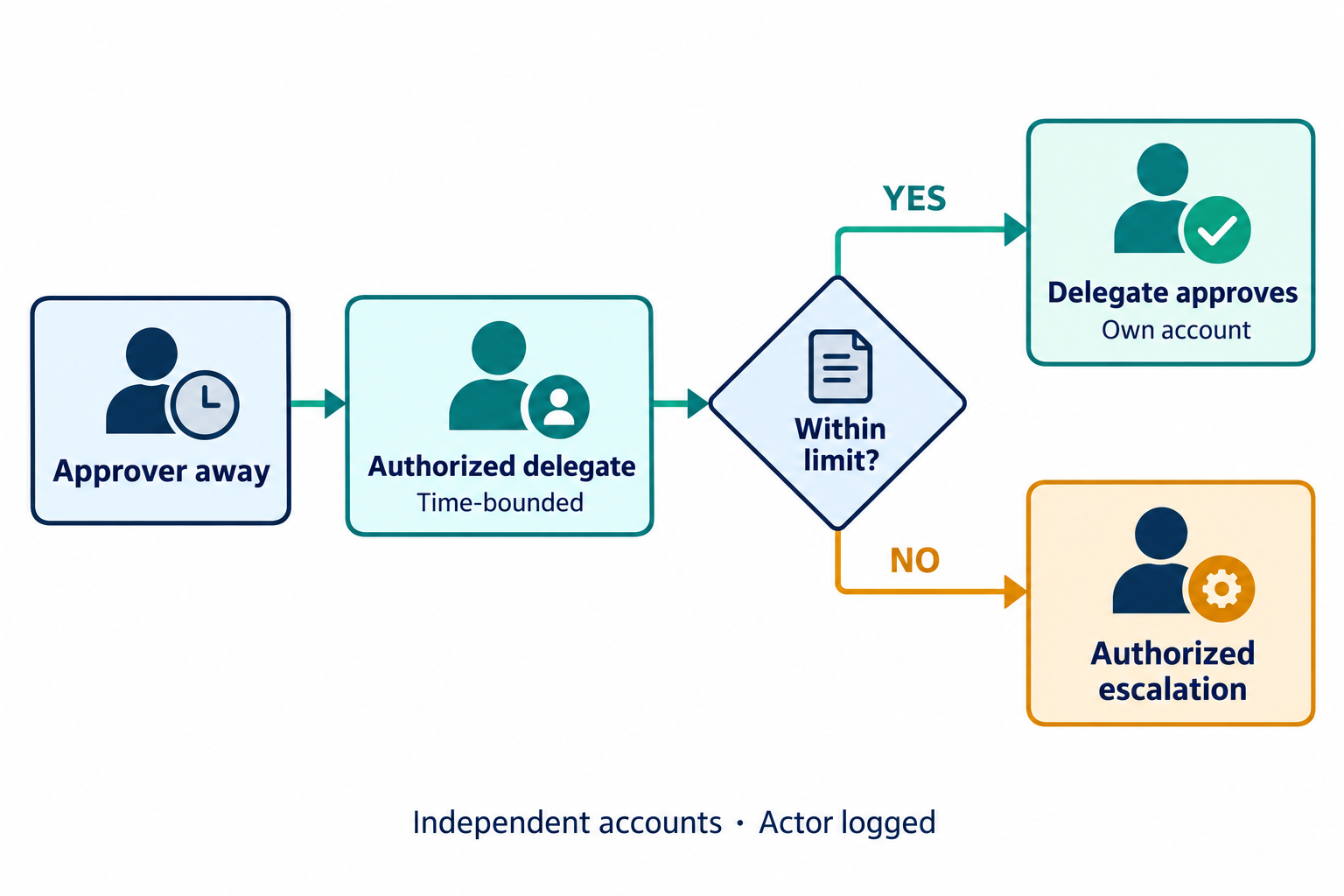
Separate escalation from granting authority. Sending another manager a notification does not establish that they may approve. The system needs to check permission for the action being processed, not merely display a button on one screen.
Use understandable examples: one document within the limit, one above it and one outside the delegated task type. Agree on the expected outcomes first, so testing does not stop at whether a notification was delivered.
Explain the state to the requester
The requester needs to understand the status and available next steps without reading irrelevant internal settings. They might see that an item is awaiting review by a delegate, where sharing that information fits organisational policy.
Do not display “approved” merely because assignment succeeded. Reassignment, review, requested changes and the final decision are different events. Accurate messages help prevent duplicate submissions caused by somebody thinking the first request disappeared.
When delegation is withdrawn, update unfinished work according to the agreed rule. Explain if somebody who could previously act is no longer authorised. Avoid silent changes that leave two people both believing they must decide.
Test time and state changes
Check before the period starts, while it is active and after it ends. Include a form left open while authority expires. Processing needs to follow the current rule so an old screen does not become a way around the limit.
Also check a changed delegate, early withdrawal and tasks already decided. A valid historical decision must not be rewritten as if a new delegate had made it. A change in responsibility for future work differs from a change to historical facts.
Keep the expected result and actor for each case. A short scenario set gives the team a stable reference when approval stages grow, while keeping responsibility clear during absence or an unexpected return to work.
Try a delegate opening a document shortly before the period ends. Explain why a later action cannot proceed and where the task goes next. An unsubmitted choice must not appear as a final decision. This separates successfully opening a page from still having authority when the decision is processed.
Use the web-app permission matrix to discuss actions. When speaking with Creatyf, bring real absence scenarios and documents cleared of personal information. Delegation becomes understandable when its boundaries, timing and decision identities can be checked together.
Official sources
Build
Continue with related guides.

Preparing a Business Website Project
A practical guide to aligning goals, users, content, ownership, scope, and operational readiness before a business website project begins.

Websites, Web Apps, or Mobile Apps
A decision framework for choosing a website, web app, or mobile app based on user tasks, device capabilities, data, distribution, and operating cost.

From Business Goal to an Actionable Digital Brief
How to connect a business problem, user needs, scope, constraints, evidence, and project decisions in one actionable brief.