

Pagination or Infinite Scroll for Business Data Lists?
Choose pagination, load more or infinite scroll for business lists around finding records again, comparing them and taking action.

Choose pagination or infinite scroll around the user’s task, not around which option looks more modern. Business lists are often used to locate one record, return after opening its details, compare rows or resume an interrupted review. Those needs differ from simply browsing a stream of content.
Pagination divides results into navigable sections. Infinite scroll loads further results as the user approaches the end. Load more provides an explicit button to extend the list. All three can be useful, but search behaviour, position recovery and changes to the underlying data still need deliberate decisions.
Begin with recurring work
Consider a fictional purchase-request list filtered by month and status. A staff member needs to locate R-105, open its details and return to review the next request. Ask what must survive that return: filters, sort order, position and selected rows.
Another task might involve browsing recent documents until something relevant appears. The user may not know a record number in advance. That activity can need a different navigation pattern from an administrative review that must cover a defined set of records.
Describe the task in one sentence before choosing a component. “Review every pending request for this month” gives more direction than “make the list comfortable”. Also decide how the person knows that the review is complete. A list without a meaningful endpoint can obscure that answer.
Compare the same task
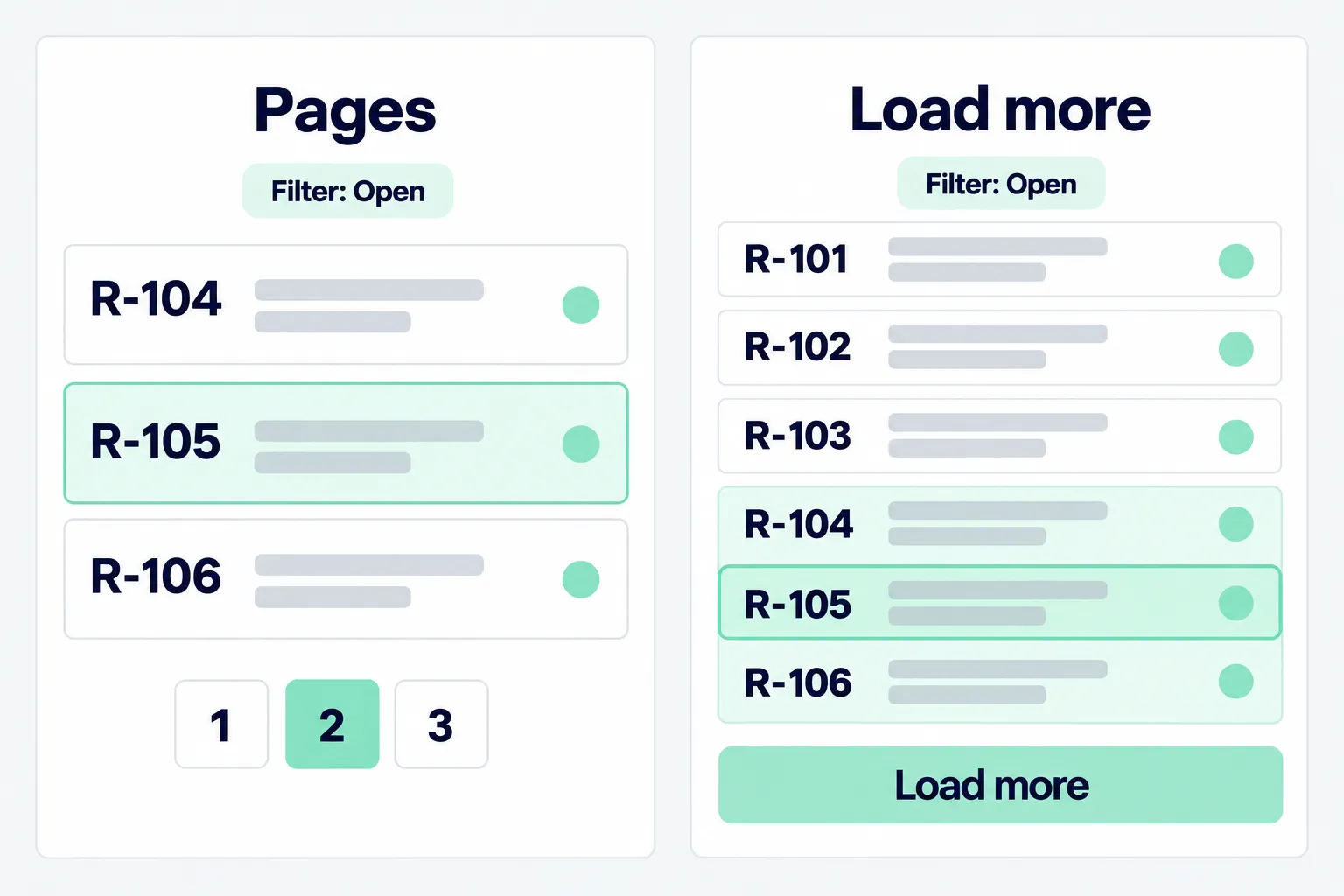
Test pagination and incremental loading with the same records, filters and goal. Do not show a short, well-organised list for one option and hundreds of unsorted rows for the other. Such a comparison measures different examples rather than different navigation patterns.
Ask users to find R-105, read its details, return and continue to the next record. Observe whether their position disappears, they must scroll from the top or they lose track of completed work. Record task outcomes alongside any preference for the appearance.
Google’s pagination documentation distinguishes pagination, load more and infinite scroll for public pages. For an internal application, use those distinctions as background rather than a universal answer. The actual work remains the basis for the choice.
Make position and result boundaries understandable
Pagination can give a section of results a clear boundary. A page number does not necessarily identify the same records after new data arrives or sorting changes, however. Show the active filters and order so users understand the set they are reading.
With load more or infinite scroll, distinguish between all results being loaded and more results remaining. A stopped list should not ambiguously mean either the end or a network failure. A retry action can help if it has a clear effect and does not duplicate rows.
If the total is not available, avoid presenting an estimate as an exact count. The team might instead show how many records have loaded. This decision should reflect the available data without implying that the entire task is already covered.
Preserve context when opening a record
Keep filters, search terms and sort order when a person opens a record and returns. Decide whether the application restores the same result section or refreshes the list. Explain relevant changes that occurred while the person was reading details.
Do not rely on scroll position as the only identity. A new request can shift records down the list. Record identity and filter context support clearer recovery than remembering that something appeared roughly halfway down the screen.
For links shared between users, decide which context can be included. Access rules still apply; a link does not grant permission to view every result. Avoid placing sensitive information in the address merely to preserve search state.
Test keyboard and assistive reading
Check dynamically extended lists with a keyboard and relevant assistive technology. Does focus remain understandable? Can someone move past the list to the content after it? Automatic loading should not continually push the next controls further away.
The W3C feed pattern illustrates that scroll-loaded content has specific interaction needs. A feed is not a universal recipe for business tables. Select semantics and behaviour that fit the content, then test real tasks in the implementation.
Also examine multiple-row selection. Explain whether “select all” means the visible page, already loaded records or every result matching the filter. The difference can be consequential when the next action changes many records at once.
Choose from task evidence
Use pagination when bounded sections and returning to a particular part support the work. Consider load more when users benefit from controlling when additional results arrive. Infinite scroll can suit continuous exploration if context, accessibility and recovery remain sound.
None of these choices removes the need for useful search and filters. If someone must navigate many sections just to locate one known number, improving search may matter more than replacing the scrolling pattern.
Discuss list behaviour while planning a web app, using representative records and actual tasks. Through Creatyf, the team can agree return behaviour, row selection and handling of changed data before the list becomes part of daily operations.
Official sources
Build
Continue with related guides.

Preparing a Business Website Project
A practical guide to aligning goals, users, content, ownership, scope, and operational readiness before a business website project begins.

Websites, Web Apps, or Mobile Apps
A decision framework for choosing a website, web app, or mobile app based on user tasks, device capabilities, data, distribution, and operating cost.

From Business Goal to an Actionable Digital Brief
How to connect a business problem, user needs, scope, constraints, evidence, and project decisions in one actionable brief.