

Business Data Search: Choosing Exact or Partial Matching
Define code and name search through exact, prefix and contains examples, then test normalization, result selection and the user’s permitted data scope.

Business data search needs matching rules that fit the task. Looking up a known document code differs from remembering part of a product name. Exact matching helps locate a particular identity, while prefix or partial matching helps when the complete stored value is not known.
Do not assign one behaviour to every field simply because the search controls look alike. Start with the user’s question: are they opening a code already in front of them, finding a partly remembered name, or narrowing several candidates? The answer determines which records should appear and how the result needs to be presented.
Distinguish codes from names
For a unique code, users generally want an unambiguous result. Entering AB-12 and receiving AB-120 can be confusing if the interface does not explain its matching rule. For a product name, an overly strict rule can instead make users think a record is absent when they entered only part of its name.
List the searched fields and example values. Codes may contain hyphens, leading zeros or a fixed length. Names may contain several words and similar spellings. Those examples support design better than asking for “Google-like search” without explaining what staff need to accomplish.
Define behaviour with example results
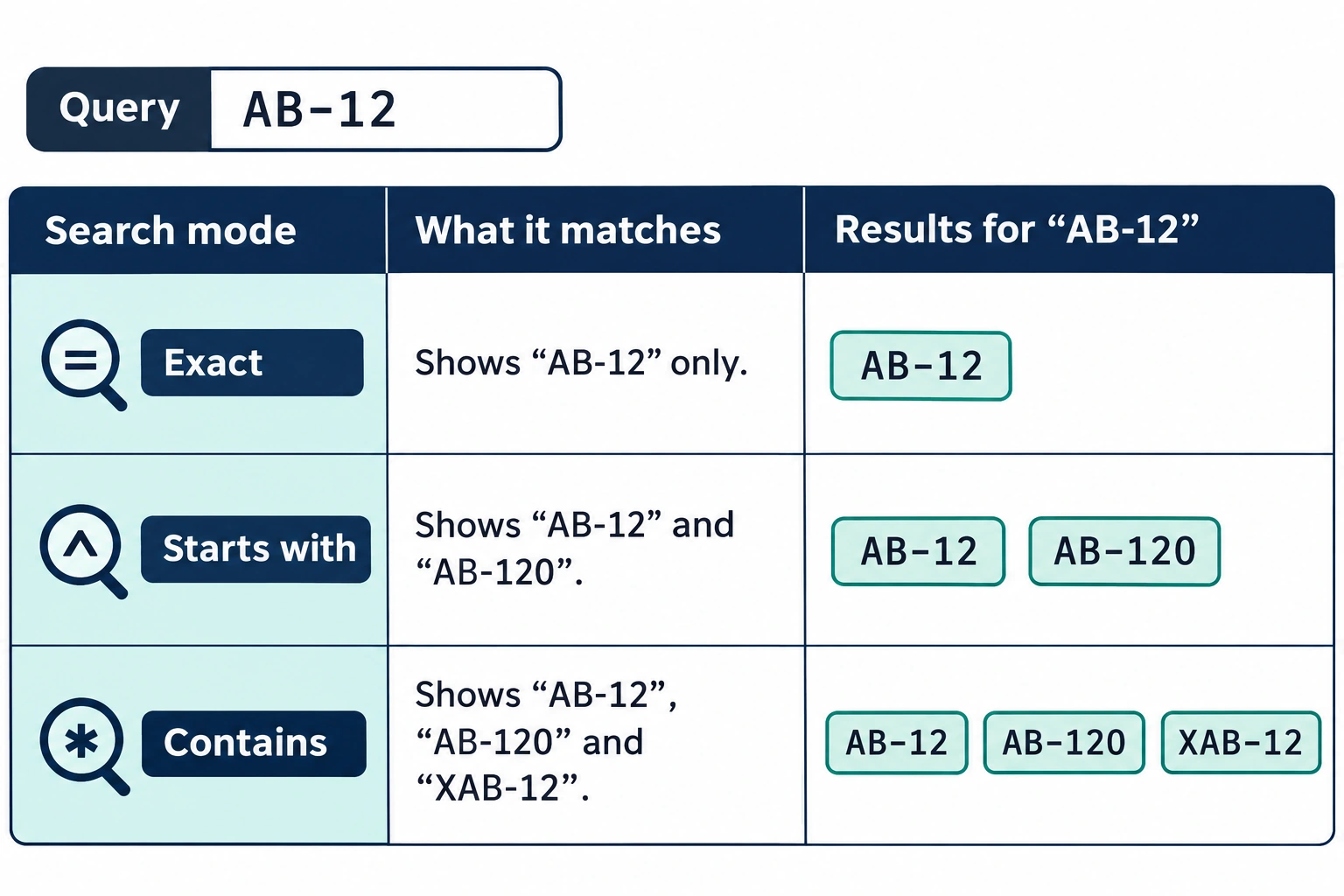
Suppose the available codes are AB-12, AB-120 and XAB-12. In this literal matching example, exact mode returns only AB-12 for that query. Prefix mode can also return AB-120. A contains mode can add XAB-12 because the character sequence appears inside that value.
These are agreed rules, not automatic behaviour shared by every search engine. The developer needs to define text processing before matching. Identically named modes can produce different results when a system splits words, ignores punctuation or normalizes characters differently. The label alone is not an adequate specification.
Prepare input and expected-result pairs using real business examples. Include at least one record that should not appear. Negative examples reveal overly broad results that can be missed when reviewers check only whether one correct record was found somewhere in the list.
Agree on letters, spaces and punctuation
Decide whether uppercase and lowercase are equivalent. Define handling of leading or trailing spaces, repeated spaces and code hyphens. Do not automatically remove a character that distinguishes two valid identities within the business. A convenient-looking normalization can create ambiguity.
For example, AB-12 and AB12 might be alternative spellings for one product or two different product codes. The application cannot determine that relationship from resemblance alone. If aliases are needed, maintain an explicit connection and show the official code in the results.
Use existing data examples for accented names and language variations. The objective is understandable behaviour, not the widest possible normalization across every field. Tests should include values that become ambiguous when a character or distinction is ignored by the matching process.
Distinguish suggestions from a selected result
Suggestions while typing help users narrow the list, but do not necessarily mean a record has been selected. Show useful distinguishing information, such as code and short name, so similar candidates remain recognizable. Do not silently select the first result when the user performs an ordinary form action.
If the choice establishes a data relationship, store the correct record identity. Text left in the search box is not always proof of a completed selection. Also define what happens when the user edits that text after choosing a record, so the visible text and stored relationship cannot quietly diverge.
Control result scope and search workload
Partial matching can produce a very broad result set on large datasets. Elasticsearch’s wildcard documentation explains that some patterns require more resources. That supports deliberate design with the developer rather than offering unrestricted pattern syntax in a simple interface.
Decide when searches run, how long lists are divided and which context narrows the result. The query string documentation also demonstrates that text processing has its own rules. Business users should not need to learn the engine’s syntax merely to use an everyday lookup.
Results and suggestions must respect access permissions. A matching fragment should not reveal the identity or name of a record the user cannot read. The permitted data boundary includes displayed counts and previews, not only the record page opened after selection.
Test the complete work task
Test complete codes, partial names, empty input, misspellings and an initially incorrect choice. Check whether users understand why a result appeared and can change their selection without losing other work. Keep the agreed examples as acceptance material for the feature.
Combine them with filter, reset and empty-result behaviour so searches do not leave hidden context behind. For a Creatyf brief, bring sample codes and names together with expected results. Concrete rules make the discussion more useful than choosing an exact or partial match label alone.
Official sources
Build
Continue with related guides.

Preparing a Business Website Project
A practical guide to aligning goals, users, content, ownership, scope, and operational readiness before a business website project begins.

Websites, Web Apps, or Mobile Apps
A decision framework for choosing a website, web app, or mobile app based on user tasks, device capabilities, data, distribution, and operating cost.

From Business Goal to an Actionable Digital Brief
How to connect a business problem, user needs, scope, constraints, evidence, and project decisions in one actionable brief.