

Preventing Conflicts When Two Users Edit the Same Record
Design version checks and recovery choices for concurrent business-data edits so one person's work is not silently overwritten.

Concurrent edit conflicts happen when two people open the same record and later save changes based on different states. Disabling a save button after a click does not solve this problem. The application needs to know whether the record used as the editing basis is still current when a save request reaches the server.
For a business web app, detecting the conflict is only part of the decision. The team also needs to define what users see, how unsaved work is retained and who can decide what happens next. The following example uses a fictional purchase request, PR-017.
Recognise a changed version
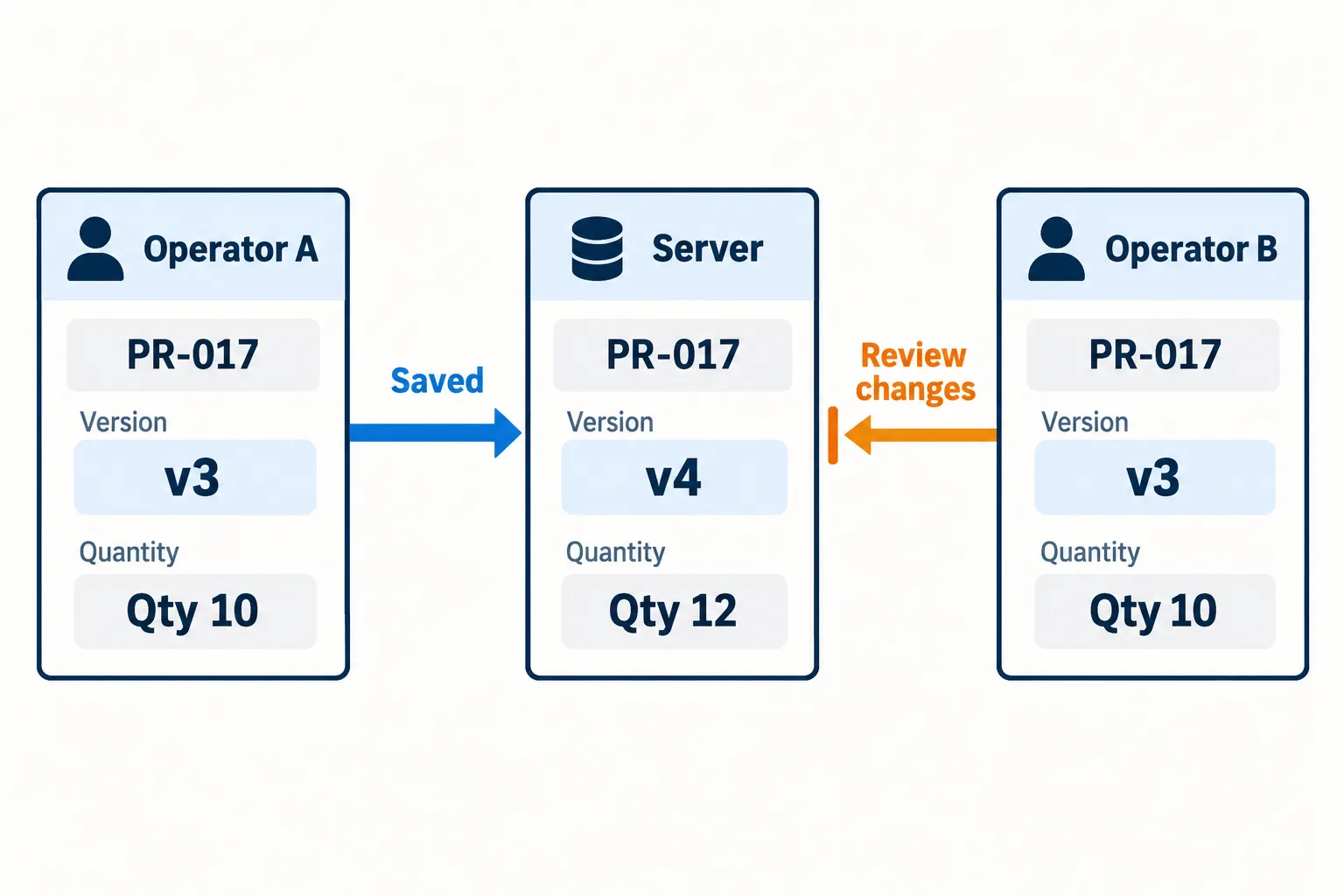
Operators A and B both open PR-017 at version 3. A changes the quantity from 10 to 12 and saves successfully, producing version 4. B still sees quantity 10 in version 3 while changing the delivery note from Standard to Urgent. If the application accepts B’s entire form without checking, A’s updated quantity could be replaced with its earlier value.
A version check compares the editing basis with the stored state when the change is about to be applied. If they differ, the application rejects the stale save and explains that the record changed. This protection belongs in the server’s save operation, not only in the visible form.
Microsoft’s conditional operations documentation shows ETags used for version checks. The numbers 3 and 4 here are readable example labels. An implementation’s version token does not need to be a sequence of increasing numbers.
Distinguish a conflict from an ordinary failure
“Save failed” does not explain whether the network disconnected, access was denied or the record changed. For a conflict, communicate the relevant reason: somebody saved a change after this form was opened. Identifying that person may help coordination where access rules permit it.
Keep B’s input visible or available through an appropriate recovery state. Do not discard it just to load the latest record. The user needs to understand which values are stored and which remain local work.
Retained input is not yet official data, however. Make that status clear so the user does not assume the operation is complete. Copying values into a fresh screen also does not establish that every value remains suitable for the latest business state.
Offer choices before overwriting changes
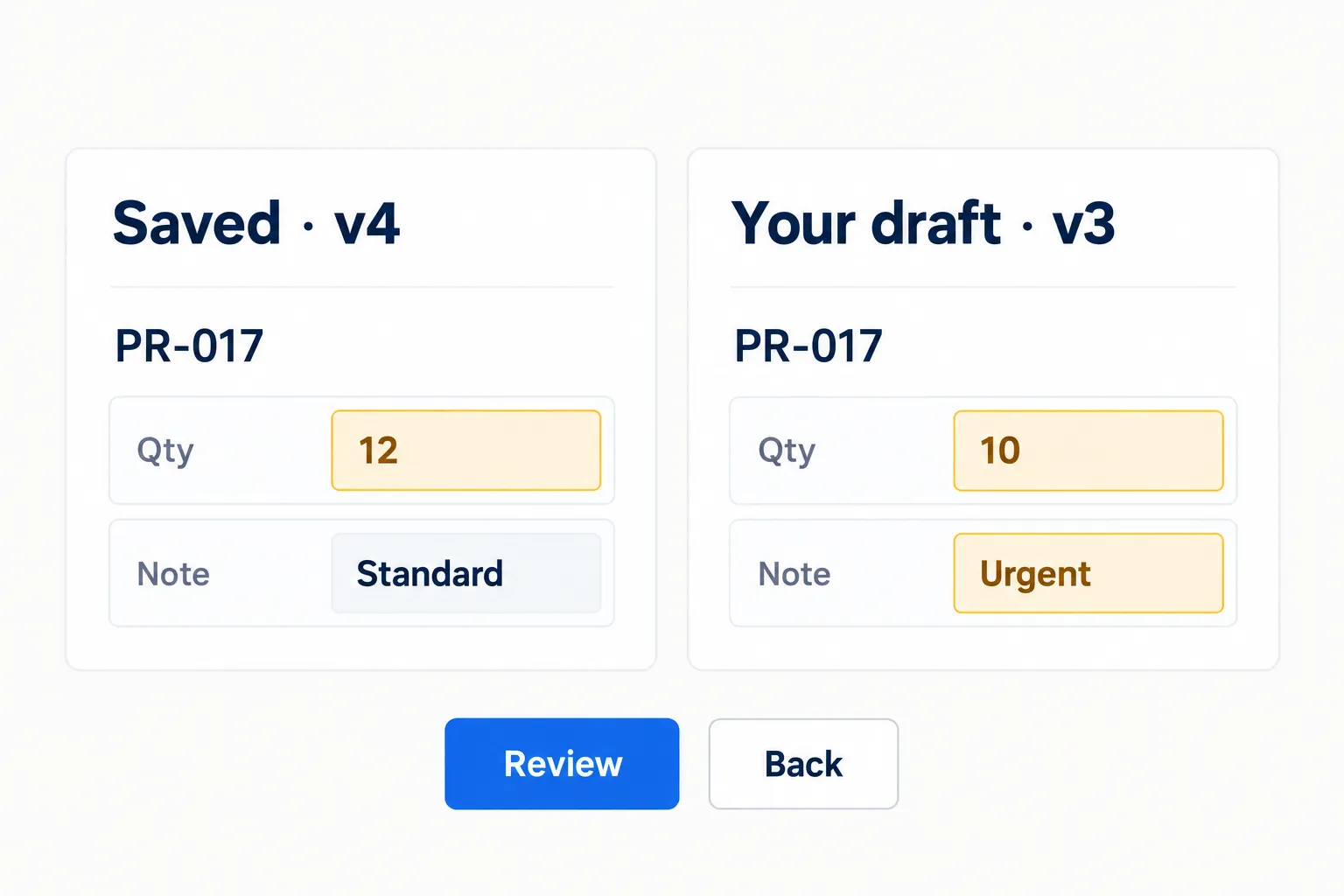
Offer actions that fit the business rules: view the current record, compare changes or reapply selected input. Avoid making “overwrite everything” the only recovery route. A person who does not understand A’s changes could accidentally remove an important decision.
For PR-017, B needs to see A’s current quantity alongside their own delivery note. After reviewing, B can apply the note to the latest record if their permissions and the request status still allow it. That save still needs a version check because another person may have changed the record again.
Vaadin’s optimistic locking guide explains this kind of conflict checking. The interface choices still require application-specific decisions: a technical mechanism does not automatically select the right business outcome.
Do not automatically merge every separate field
Changes in different fields can appear easy to combine, yet those fields may be related. A required date and delivery address, for example, may depend on an agreed schedule. Check the rules before deciding that separate-field edits are always safe.
Process status matters too. If PR-017 was approved after B opened the form, B may no longer have permission to edit it. Version checks must work alongside server-side permission and state-transition checks, rather than replacing them.
For derived values or records containing several lines, agree the protected boundary. Does a version cover the whole request, individual lines or a related group of fields? Describe the consequences in operational language so the team can assess the result without reading implementation code.
Test risky sequences, not just the message
Prepare two sessions with different users and open the same record. Save A’s changes, then try saving B’s stale form. The expected result is a detected conflict, A’s changes preserved and B’s input available for review without being treated as saved.
Repeat with a status change, deleted record and changed access rights. Also test B reviewing the latest version before a third person saves another change. The application must check again instead of allowing an exception because a conflict dialog appeared earlier.
Inspect the final stored data and relevant history. Success is not established by a message appearing. Confirm that rejected changes do not trigger notifications or subsequent business actions that should occur only after a successful save.
Agree behaviour with the process owner
Before implementation, define the protected data, conflict actions, input recovery and who may resolve differences. Demonstrate the consequences using PR-017 or a similar operational example.
This complements preventing duplicate save actions while testing a different sequence of events. When planning a web app with Creatyf, bring examples of work where several people edit the same record. They provide a concrete basis for choosing protection before conflicts affect live business data.
Official sources
Build
Continue with related guides.

Preparing a Business Website Project
A practical guide to aligning goals, users, content, ownership, scope, and operational readiness before a business website project begins.

Websites, Web Apps, or Mobile Apps
A decision framework for choosing a website, web app, or mobile app based on user tasks, device capabilities, data, distribution, and operating cost.

From Business Goal to an Actionable Digital Brief
How to connect a business problem, user needs, scope, constraints, evidence, and project decisions in one actionable brief.