

Merging Duplicate Customers: Review Identity and Transaction References
Merging duplicate customers requires reviewing identity, retained values and transaction references before changing data.

Merging duplicate customers requires reviewing identity, retained values and transaction references before changing data. Similar names alone do not establish that two records represent the same customer.
This differs from a Save button submitting twice. Two customer masters may already have been used for months by different teams. One contains a newer address while the other points to older transactions. Deleting either without understanding those relationships can remove context that somebody still needs.
Establish that the records represent one customer
Decide which information can support identity review in your business. Names, addresses, contacts and organisational identifiers may help, but each has limitations. Two similarly named branches might need to remain separate. A changed name does not automatically establish a different legal organisation either.
Show why the system flagged a possible duplicate. A match in particular fields can invite review by an authorised user. “Possible” has a practical meaning here: the system proposes an investigation rather than deciding identity from one similarity. Make the supporting information accessible instead of relying on an unexplained confidence badge.
Where evidence is insufficient, allow a hold or a not-duplicate decision. Users should not have to merge records merely to clear a warning list. Retain the relevant review outcome so that an examined pair does not repeatedly interrupt work without new information or a meaningful change.
For example, two organisations may share an administration-office phone number. That match deserves review but does not prove their transactions should be combined. Ask someone who understands the customer relationship and reporting needs. Include this kind of case in testing instead of testing only pairs already known to be identical.
Choose explicitly which values to keep
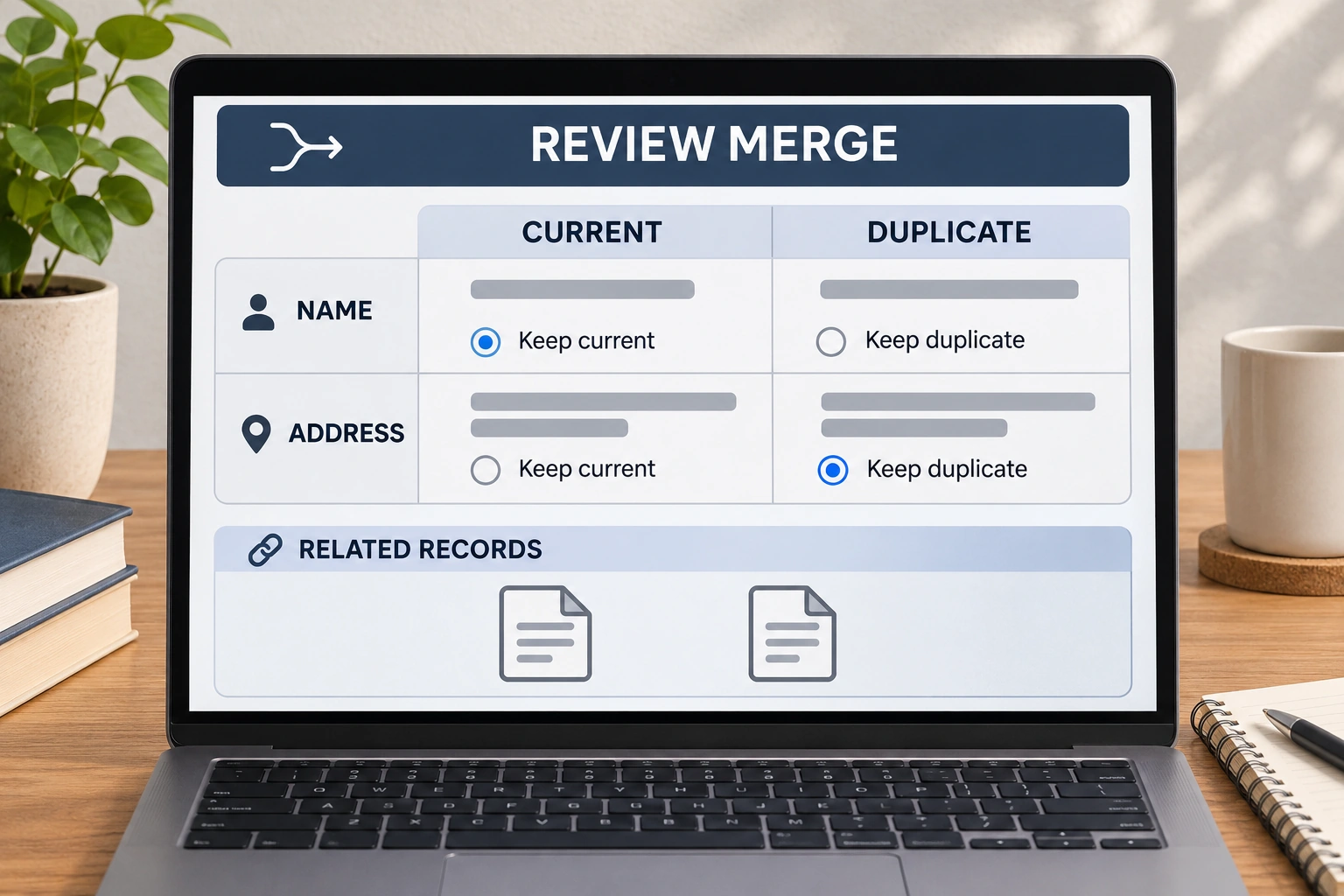
The preview should identify the retained record, the comparison record and their different values. Users need to understand the final value for every significant field. The newest record is not necessarily correct in every respect, so record age alone is a poor universal selection rule.
A new address may be verified while the newer record’s contact information remains incomplete. Decide field by field as required. Distinguish missing information from an intentional request to clear a value. Where both records contain free-text notes, explain how they are treated rather than silently discarding one description.
Business Central’s duplicate-merging documentation demonstrates value selection and conflict checks involving related data. Apply the principle of visible decisions to your own application while defining the actual rules around its data model and business process.
Show the effect on related transactions
Before confirmation, identify the data groups referencing both customers. These might include orders, invoices, contacts or activities, depending on the system. Counts communicate scope, but users also need a way to examine relevant exceptions rather than being given an unexplained total.
Do not assume every attachment or external system follows the merge automatically. Dataverse’s merge guidance documents limits for particular record types and relationships. In your web app, specify what is combined, redirected, retained or left for separate follow-up.
If transactions store the name and address applicable when they were issued, choose their historical treatment deliberately. Redirecting a master reference and rewriting a document’s historical contents are different decisions. The process owner should know whether older transactions will continue to reflect their original event context.
Execute a decision that is still current
Recheck the data when execution begins. An earlier preview can become stale if someone edits a customer or adds transactions. The user needs to know when the action being applied no longer matches the state they reviewed. An old confirmation should not conceal a materially changed decision.
Limit the operation to appropriate roles and retain its reason and actor. Confirmation should name the retained identity and main effects instead of asking only “Are you sure?”. Where execution uses background processing, communicate waiting, running, completed and failed states according to the system’s actual capabilities.
Define failure handling before using the feature. Avoid a partial result indistinguishable from success. Recovery choices depend on the real architecture and relationships; do not promise an Undo button after merging unless the system can genuinely restore the relevant state safely.
Check references after the merge
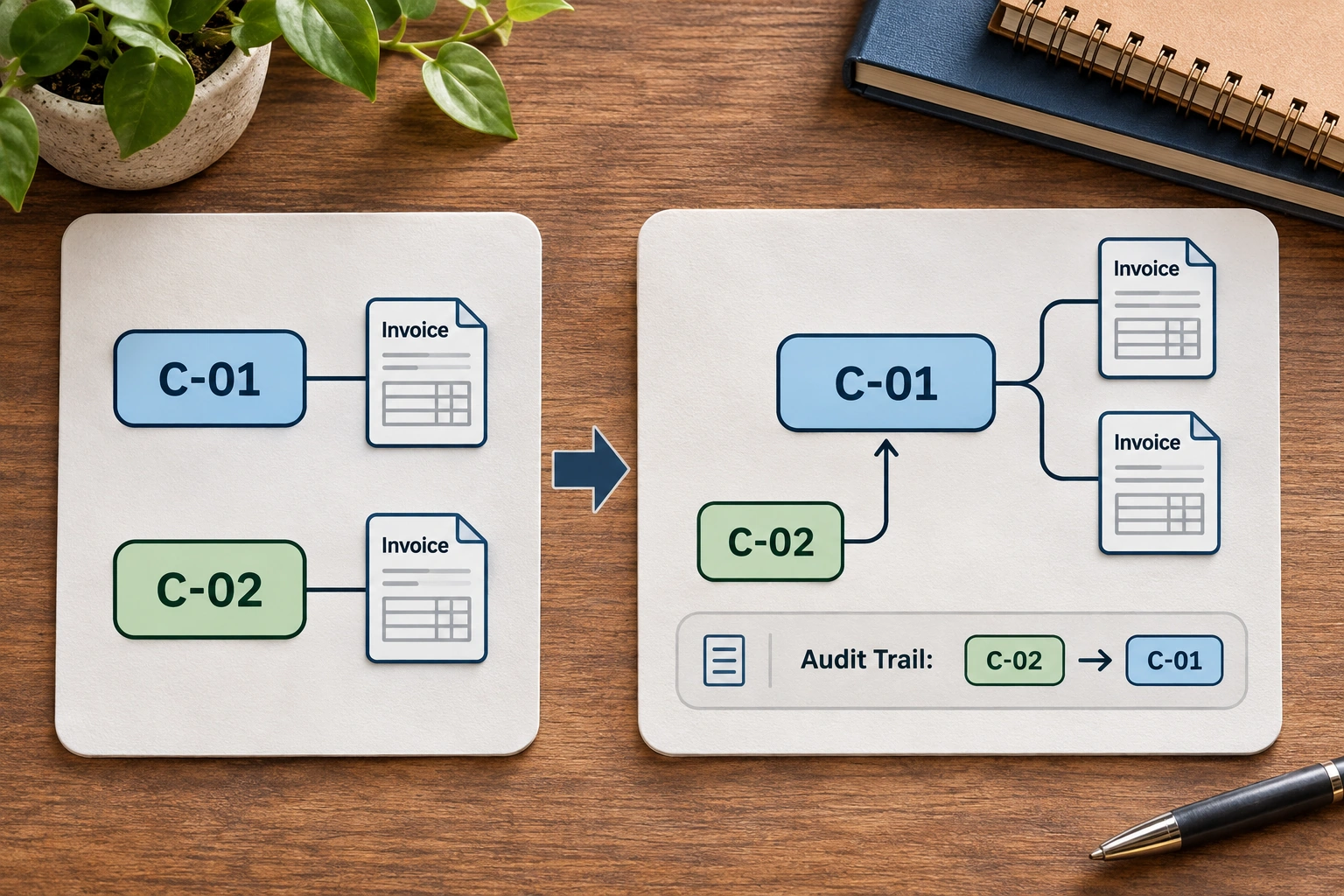
Inspect the retained customer and representative related transactions. Confirm the agreed behaviour of search, reports and old links. Keeping the earlier identity relationship can explain why a reference now leads to a different customer identifier from the one staff remember.
The history should connect original and resulting identities, time and significant decisions. This supports enquiries containing an old number. Do not make that number appear never to have existed while people may still encounter it in working documents or an earlier export.
For neighbouring actions, read the difference between archive, deactivate and delete. A merge is intended to unite identities established to be the same. Once that purpose is explicit, previews and testing can concentrate on the values and references that must remain traceable.
Official sources
Build
Continue with related guides.

Preparing a Business Website Project
A practical guide to aligning goals, users, content, ownership, scope, and operational readiness before a business website project begins.

Websites, Web Apps, or Mobile Apps
A decision framework for choosing a website, web app, or mobile app based on user tasks, device capabilities, data, distribution, and operating cost.

From Business Goal to an Actionable Digital Brief
How to connect a business problem, user needs, scope, constraints, evidence, and project decisions in one actionable brief.